
In the evolving Salesforce ecosystem, new standards often arrive before old systems fade out.
When External Client Apps were introduced as the future of third-party integrations, many teams assumed Connected Apps would soon be obsolete.
But in real-world projects, transitions rarely happen overnight.
At Thinkvibes, we faced this exact challenge and discovered that sometimes, the “deprecated” path is still the bridge that gets you there.
As we began integrating MuleSoft with Agentforce, one question surfaced how do you enable secure authentication when Salesforce is evolving its entire app framework?
The Challenge
Every integration story starts with a simple goal: build a secure, reliable connection. Ours was between MuleSoft and Agentforce.
What is Agentforce ?
Agentforce is Salesforce’s AI-powered customer engagement platform, built on the Einstein 1 ecosystem. It helps businesses design and deploy conversational agents intelligent assistants that can answer questions, fetch data, perform actions, or guide customers, all powered by Salesforce’s AI layer.
Why connect Agentforce with MuleSoft ?
Like any AI system, Agentforce is only as smart as the data it can access, and most of that data lives outside Salesforce in systems like SAP, ServiceNow, or custom APIs. Connecting Agentforce with MuleSoft allows it to pull real-time data securely, respond intelligently, and deliver true conversational automation without breaking security boundaries.
In short, MuleSoft acts as the data bridge that makes Agentforce truly powerful.
We needed to establish a secure, end-to-end connection between MuleSoft and Agentforce, one that would allow real-time data exchange and authenticated communication.
Simple enough, right?
Except Salesforce had recently disabled the New Connected App option in the UI.
Why?
Because of the ongoing migration toward external client apps, the next-gen authentication framework is meant to replace connected apps in the long run.
But here’s the catch
Agentforce still requires Connected Apps for certain authentication flows. MuleSoft needs the Client ID and Client Secret generated from that Connected App.And Salesforce, by default, no longer lets you create one from Setup.
It was like having all the integration pieces in place except the key that starts the engine.
The Solution
When the system says “you can’t,” the first step is to ask “why not?”
Salesforce hadn’t really removed Connected Apps; it had only hidden their creation behind the newer External Client Apps framework.
Once we understood that, the path to unlock it became surprisingly simple.
Integration flow overview:
Enable Connected App Creation → Create Connected App → Assign to Agent → Configure MuleSoft → Secure Integration Achieved
Step 1 : Enable Connected App Creation
The first fix was to re-enable the option to create Connected Apps from the UI.
1️. Go to Setup → External Client Apps → Settings
2️. Toggle on Allow creation of connected apps
And just like that, the “New Connected App” button reappears in App Manager. A small switch, but the key to everything that followed.

Step 2: Create the Connected App
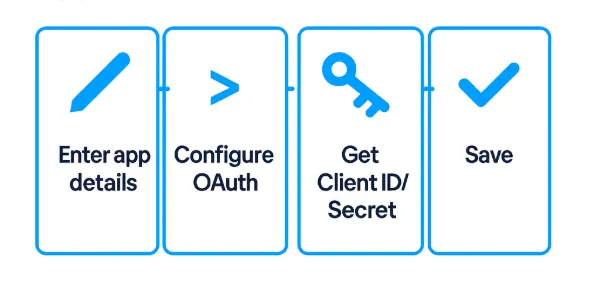
With the option restored, we created a new Connected App that would act as the secure handshake between systems.
1. Navigate to App Manager → New Connected App
2. Add basic details (Name, API Name, email).
3. Under API (Enable OAuth Settings), configure:
* Callback URL
* Selected OAuth Scopes (Full Access, Manage User Data, Perform Requests, etc.)
These two values became the credentials MuleSoft needed to authenticate every interaction with Agentforce.
Step 3: Assign the Connected App to the Agent
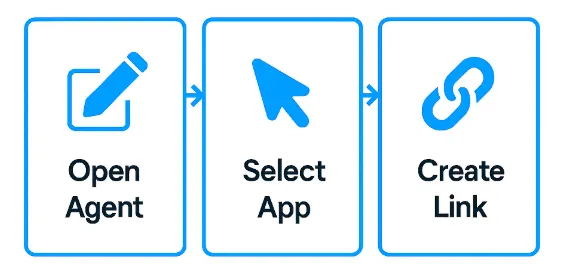
Next, it was time to bridge the app to Agentforce:
1️. Open Agent → Connections
2️. Click New API Connection
3️. Choose the Connected App you just created
4️. Save
Now, MuleSoft could securely communicate with Agentforce using Salesforce’s verified OAuth flow.
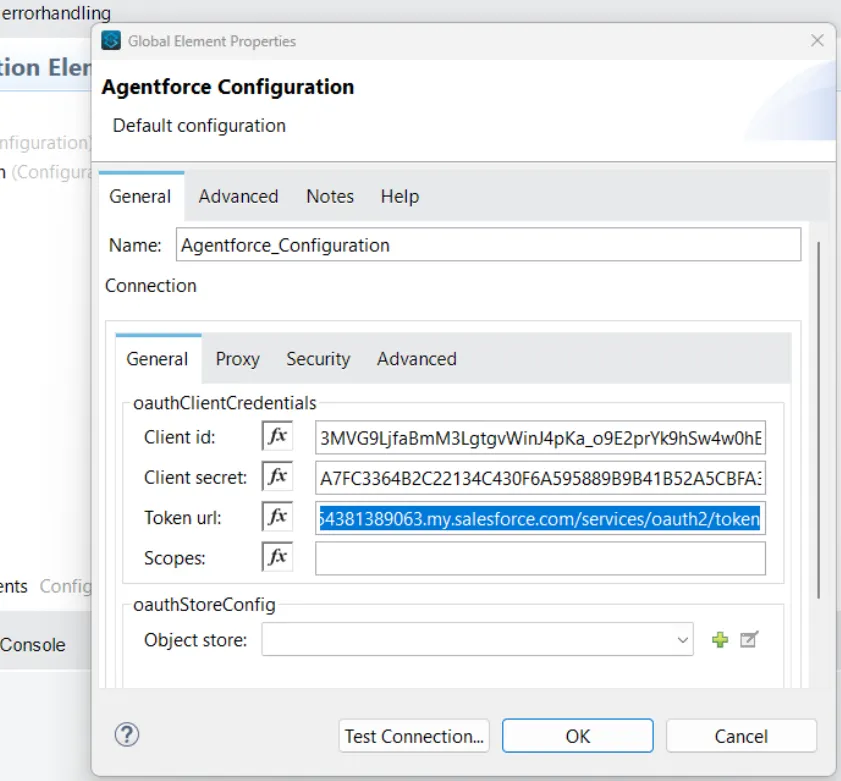
Step 4 : Configure MuleSoft
Inside Anypoint Studio, we configured the Salesforce Agentforce Connector:
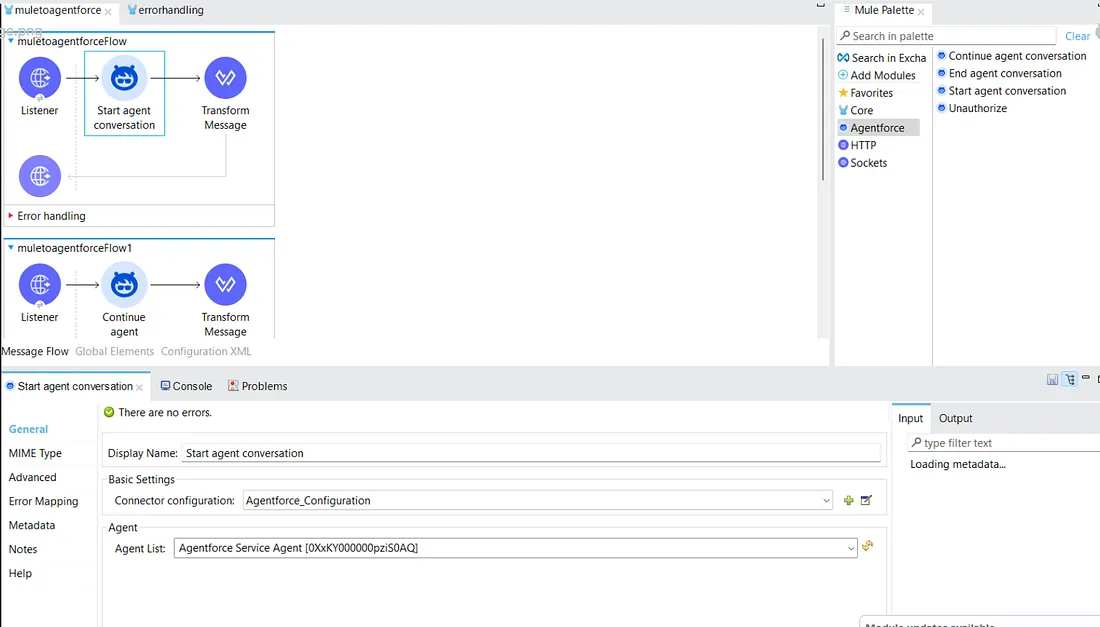
Add the connector from Mule Palette → Add Module → Agentforce Connector
2. In Global Elements, create a new Salesforce config.
3. Enter the Consumer Key and Consumer Secret from the Connected App
4. Choose the authentication method Username-Password or JWT Bearer
Implement operations such as
Start Agent Conversation (initiates a new session)
Continue Conversation (passes prompts using the session ID)
End Conversation (closes the session safely)
Finally, we orchestrated the flow:
Press enter or click to view image in full size
Step 5 : Outcome: Secure Integration Achieved
With these steps in place, we re-established:
- Secure end-to-end communication between MuleSoft & Agentforce
- Real-time session tracking and controlled authentication
- A setup that works today and adapts to Salesforce’s External Client App future

This approach not only restored a secure integration path but also ensured our architecture remains compatible with Salesforce’s next-generation frameworks.
Sometimes, the solution isn’t about reinventing the flow; it’s about finding the switch that keeps the current one alive.
Why It Matters?
Even as Salesforce transitions to External Client Apps, many real-world use cases, including Agentforce MuleSoft, still depend on Connected Apps for OAuth-based secure communication.
Re-enabling Connected App creation:
Ensures compliance with Salesforce’s authentication model
Provides granular control over tokens and user scopes
Simplifies identity and access management for developers
Keeps integrations aligned with Salesforce’s security-first architecture
For clients, the impact goes beyond configuration. This integration enables:
Faster, smarter AI interactions powered by real-time data
Reduced manual effort in support and operations
Better decision-making through connected systems
Future-ready architecture aligned with Salesforce’s modernization roadmap
By unlocking Connected App creation, we helped teams continue to innovate without downtime, risk, or rework, even as Salesforce evolves.
What’s Next: The Shift Toward Data Cloud
While MuleSoft continues to power seamless integrations today, Salesforce’s future seems to be moving toward something even bigger: Data Cloud. The goal is no longer just connecting apps but connecting data at scale, enabling a single, intelligent source of truth across systems.
Our upcoming post will unpack what this shift means, how Data Cloud works, and what it could mean for the future of integration and data strategy within the Salesforce ecosystem.
About Thinkvibes:
At Thinkvibes Software, we love solving the kinds of integration puzzles that keep digital ecosystems running smoothly. Our focus is on Salesforce and MuleSoft, helping businesses connect their systems, automate workflows, and scale confidently in the cloud.
Our team of architects and developers has worked hands-on across Salesforce’s evolution, from Connected Apps to External Client Apps and now Agentforce, Salesforce’s AI-powered conversational platform. That journey gives us the perspective to bridge what’s next with what already works.
The approach we shared in this article reflects how we think: practical, curious, and future-ready. We believe innovation doesn’t always mean replacing what exists; sometimes it’s about finding the smarter path forward.
If you’d like to explore how Thinkvibes can help you streamline your Salesforce–MuleSoft integration or modernize your cloud architecture, visit thinkvibes.com or drop us a note at info@thinkvibes.com.
We’d love to connect.